
ezCater - Food for Workplaces
ezCaterFood & Drink
4.639.00 Reviews
- Version
- 1.10.5-140
- Installs
- 100.00K
- Age Rating
- Everyone
Screenshots
Our Review of ezCater - Food for Workplaces
 Analysis by Appyee
Ordering food for a workplace sounds simple until the order involves several people, different diets, a fixed delivery window, and a meeting that cannot run late. ezCater is built around that particular kind of problem: finding restaurant food for work rather than choosing a quick personal meal. I found its focus useful because it treats workplace catering as a planning task, not just a restaurant search.
The app comes from ezCater and sits in the Food & Drink category. It is free to install, carries an Everyone age rating, and has reached over 100K installs. Its average rating is 4.6 from around 293 ratings, with 39 written reviews. Those figures suggest a solid level of interest, although I would still judge it by whether it fits the way your office actually orders food.
How ezCater feels when the network matters
The most important thing to understand is that this is an internet-dependent kind of experience. You are using the app to browse restaurants, review options, organize an order, and move through a checkout process, so a reliable connection matters at every meaningful stage. I would not treat it like a static restaurant directory that can be comfortably explored in advance without connectivity.
That becomes noticeable in a workplace setting. If I am arranging lunch from a desk with dependable Wi-Fi, the process feels naturally suited to the app. I can take time to compare choices instead of making a rushed phone call while people are asking whether vegetarian, vegan, or allergy-sensitive meals are available. On the other hand, trying to manage the same task in a basement meeting room or a crowded building with weak reception is a less comfortable proposition.
My practical advice is to do the main planning before the busy part of the day. I would look through restaurants and settle on a short list while connected to a strong network, then keep the final decisions ready before the meeting begins. This reduces the chance that a slow connection turns a straightforward order into a last-minute scramble.
The network issue is not a flaw unique to this app; it is tied to the kind of service it provides. Restaurant availability and ordering details are time-sensitive, so an app that helps coordinate workplace food needs a live connection more than a recipe app or a saved restaurant notebook would. The trade-off is convenience when connected versus less flexibility when connectivity becomes unreliable.
Why a workplace order is different from an individual meal
Using a normal restaurant app for one person is usually quick: choose a place, select a meal, and pay. Workplace food is more complicated. The useful question is not simply “What do I want to eat?” but “What can serve this group without creating confusion?” That change in perspective is where ezCater makes the most sense.
I found the app more appealing for planned office meals than for spontaneous personal dining. A team lunch, training session, client visit, or staff celebration gives the service a clear purpose. If I only want a sandwich for myself, opening a standard delivery app or ordering directly from a familiar restaurant may be faster and more familiar.
There is also a subtle planning benefit in separating restaurant discovery from the pressure of a live event. I can think about the type of food, the likely preferences in the room, and the timing before people start waiting. That makes the app valuable even before the order is placed, because it encourages a more organized workflow.
Using it from a phone, desk, or meeting room
The mobile format is most useful when I am not sitting at a permanent workstation. A workplace organizer may be moving between rooms, checking a meeting schedule, or handling a delivery while away from a computer. Having the ordering process on a phone makes that kind of coordination more practical than relying on a desktop-only routine.
Still, mobile convenience does not remove the need for concentration. A small screen is not ideal for making a complicated group decision while answering messages or supervising a meeting. I would rather prepare the order during a quiet moment than attempt to compare every option with one hand while people are waiting.
A realistic example would be a team lead arranging lunch for a training day. In the morning, I would use a stable connection to review the available choices and make sure the menu suits the group. Later, while the training is underway, the phone becomes useful for checking the order process or handling a small change without returning to a desk. The app fits that workflow better than a paper list, but only if the main decisions were made ahead of time.
Another good use is a small office where one person is responsible for recurring food arrangements but is not always at the same desk. The phone can act as a portable planning tool. The limitation is that responsibility still rests with the organizer: an app can make the process easier, but it cannot decide whether a menu is appropriate for every person in the room.
What happens when something goes wrong
Connectivity problems are only one kind of failure. Workplace food orders can also become difficult when the organizer changes the plan, a meeting moves, or someone notices a dietary requirement too late. I would approach ezCater with a recovery mindset rather than assuming every order will be effortless from the first tap.
The safest workflow is to avoid leaving the order until the last possible moment. When the event matters, I would confirm the destination, timing, headcount, and food requirements before beginning the final ordering steps. That is not glamorous advice, but it is the difference between using the app as a planning aid and using it as an emergency rescue tool.
If the connection drops while browsing, I would wait until the network is stable rather than repeatedly tapping through screens. Repeated attempts can create uncertainty about whether an action was completed. A better habit is to pause, reconnect, and review the current state carefully before proceeding. For an important workplace meal, I would also keep the restaurant name and event details noted somewhere accessible so I am not reconstructing the entire plan under pressure.
There is a trade-off here compared with calling a restaurant directly. A phone conversation can sometimes resolve an unusual request immediately, especially when the order is highly customized. The app is more attractive when I want a structured way to explore workplace food options, but direct contact may be better when the order has complicated instructions that need a human discussion.
Making careful choices with mobile data
I would normally use Wi-Fi for the discovery stage, especially when browsing several restaurants or reviewing menus for a group. That is less about a specific claim regarding the app and more about sensible mobile habits: workplace orders can involve a lot of scrolling and repeated page loading, so a strong Wi-Fi connection is the more comfortable choice when one is available.
When I am away from Wi-Fi, I would keep the task focused. Instead of opening the app repeatedly throughout the day, I would prepare the shortlist, review the important details, and complete the order in one deliberate session. This also reduces distraction and makes it easier to notice whether the selected food actually matches the event.
Data-conscious use is especially relevant for people organizing food from shared offices, temporary workspaces, or travel locations. A weak signal can make restaurant discovery feel slower, while switching between Wi-Fi and mobile data can interrupt concentration. My approach would be to plan while connected, avoid unnecessary browsing, and leave enough time to recover if the network becomes unstable.
I also would not assume that a phone screen is the best place to settle every detail. For a larger event, I would first write down the headcount and dietary needs, then use the app to turn that preparation into an order. This prevents the mobile interface from becoming the place where basic information is invented on the fly.
Who will get the most from it
ezCater is a strong fit for office managers, team leads, administrative staff, and anyone who regularly arranges meals for other people. It is also useful for a person who wants restaurant food to feel coordinated rather than improvised. The workplace focus gives the app a clearer purpose than a general delivery service when the order needs to serve a group.
I can also see value for occasional organizers. Someone who only arranges food for a meeting a few times a year may appreciate having a dedicated place to start instead of relying on scattered restaurant searches, old emails, and personal memory. The free price removes an obvious barrier to trying it, although the cost of the food itself remains a separate consideration when planning an office budget.
The app is less compelling for someone who mainly orders individual meals, already has a trusted restaurant routine, or prefers speaking directly with a restaurant for every detail. It may also feel like extra process for a very small group with an obvious choice nearby. In those cases, a familiar delivery app or direct restaurant order can be quicker.
What I would do before placing an important order
I would start by defining the event rather than immediately browsing. Is this a short team lunch, a long workshop, or a client-facing gathering? The answer affects how much variety, timing flexibility, and coordination I need. This simple step keeps the restaurant search from becoming an endless scroll through possibilities.
Next, I would make a compact list of dietary requirements and preferences. I would not rely on memory, especially when the organizer is ordering for colleagues they do not work with every day. The app can support the search and ordering process, but the quality of the result depends on the information I bring to it.
For a larger group, I would also build in time to review the final selection with another person. A second pair of eyes can catch a missing meal, an unsuitable choice, or a mismatch between the order and the meeting schedule. This is one of the less obvious benefits of treating the app as part of a workflow instead of as a one-person food shortcut.
Finally, I would complete the important steps on a stable connection and avoid waiting until everyone is already hungry. That approach makes the app feel calm and practical. Trying to use it as a last-second solution, especially from a weak signal, removes much of its advantage.
Comparing it with the usual alternatives
Compared with a general food-delivery app, ezCater feels more purpose-built for feeding colleagues. A general service may be better for a personal lunch, quick takeaway, or one familiar restaurant. ezCater is more relevant when the order is connected to a workplace event and the organizer needs to think beyond one person’s preferences.
Compared with ordering directly from a restaurant, the app offers a more app-centered way to explore choices and organize the decision. Direct ordering can still win when I already know exactly what I want or need to discuss unusual details. The choice depends on whether discovery and coordination are more important than a direct conversation.
Compared with spreadsheets, email threads, or a shared chat, the app has the advantage of keeping the food-ordering task closer to the restaurant selection itself. Those other tools can still be useful for collecting preferences and confirming attendance, but they are not substitutes for the ordering step. I see ezCater as one part of a larger process, not a complete replacement for workplace communication.
The best comparison is therefore not “Which app delivers food fastest?” but “Which tool creates the least confusion for this type of meal?” For a personal order, another option may be more efficient. For planned food at work, this app has a clearer reason to exist.
Version, accessibility, and everyday practicality
The current version is 1.10.5-140, and the app runs on Android 8.0 or later. That makes it available to people using a range of Android phones, including devices that are not among the newest models. I would still keep the operating system updated where possible, particularly when using a phone for important work arrangements.
The Everyone rating makes the app broadly suitable from an age-classification perspective. In practical terms, the more important question is whether the person using it is comfortable coordinating a group order and checking details carefully. The interface may be approachable, but workplace catering still requires judgment and organization.
I appreciate that the app is free to install because it lets an office organizer test whether the workflow suits their team before committing to it as part of a routine. I would judge it after trying a real but manageable event, not merely by browsing. A small team lunch is a sensible first test because it reveals whether the restaurant discovery and ordering process fit the way the office works.
My connectivity verdict
My overall impression is that ezCater is most successful when used as a connected planning tool for workplace meals. Its value is not just finding something to eat; it is helping an organizer move from a vague group need to a more deliberate restaurant choice. That makes it more relevant for meetings, training days, and office events than for casual solo dining.
The main limitation is equally clear: I would not depend on a weak connection or a last-minute mobile session for an important order. Plan early, use a reliable network, keep the event details organized, and leave room to recover from changes. Those habits make the experience considerably smoother.
After using it, I would recommend the app to a friend who regularly feeds a team and wants a dedicated starting point for workplace food. I would skip it for a simple personal meal or an order that is easier to handle directly with a known restaurant. In the right situation, the strongest feature is the structure it brings to a group decision, while its biggest weakness is that the convenience depends on being prepared and connected when the order matters.
Verdict
Strengths of ezCater - Food for Workplaces
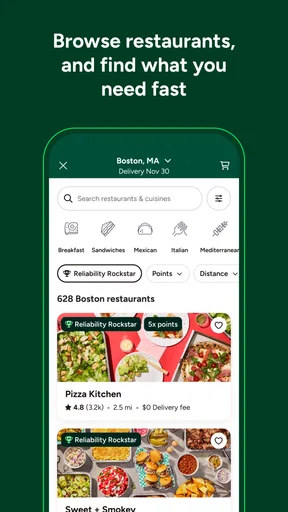
- Easy ordering from multiple local restaurants in one place.
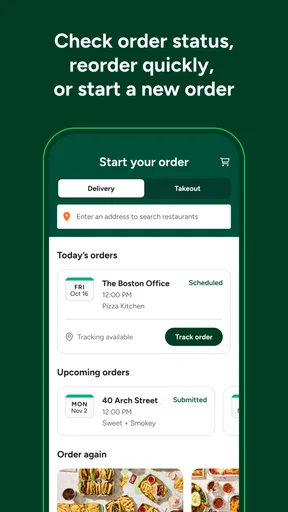
- Scheduled delivery helps coordinate meals for meetings and office events.
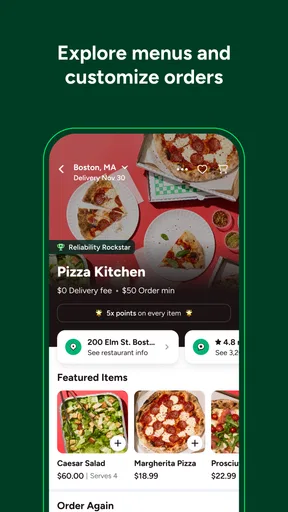
- Catering menus often include options for different group sizes.
- Order details and receipts make workplace expense tracking easier.
- Customer support can help resolve delivery or order issues.
Limitations of ezCater - Food for Workplaces
- Restaurant availability and delivery coverage vary by location.
- Service fees can noticeably increase the final order total.
- Menu prices may be higher than ordering directly from restaurants.
- Changes or cancellations may be limited close to delivery time.
- Large catering orders require careful review of portions and dietary details.
Similar Picks in This Category
View All
Rappi: Food Delivery, Grocery
Rappi, Inc - Delivery3.5

McDonald’s: Cupons e Delivery
Arcos Dorados4.3

Swiggy: Food Instamart Dineout
Swiggy4.7

Blinkit: Groceries & more
Blinkit4.8

foodpanda: food & groceries
Foodpanda GmbH a subsidiary of Delivery Hero SE4.0

Zomato: Food Delivery & Dining
Zomato4.7
Frequently Asked Questions
What is ezCater - Food for Workplaces, and who is it designed for?
ezCater is a workplace catering platform that helps businesses order meals from local restaurants and catering providers. It is mainly designed for office managers, administrative assistants, team leaders, event organizers, and employees responsible for arranging food for meetings, company events, training sessions, or everyday office lunches. The service is especially useful when you need to coordinate larger orders without contacting several restaurants individually.
How do I place a catering order through ezCater?
After entering your delivery location, you can browse available restaurants and catering menus, compare prices, review minimum order requirements, and select dishes for your group. The ordering process generally allows you to specify the date, delivery time, guest count, dietary preferences, and delivery instructions before checkout. It is important to review the final order carefully, since availability, fees, and menu options can vary by location and restaurant.
Can ezCater accommodate dietary restrictions and different food preferences?
Many restaurants listed on ezCater provide options for common dietary needs, such as vegetarian, vegan, gluten-conscious, dairy-free, or allergen-aware meals. However, the selection and preparation standards depend on the individual restaurant. Before ordering, check menu descriptions and available labels, and contact the restaurant or ezCater support if an allergy is involved. Users should clearly communicate restrictions and understand that shared kitchens may still present cross-contact risks.
How much does ezCater cost, and are there additional fees?
The total cost depends on the restaurant, number of guests, selected dishes, delivery distance, taxes, service charges, and any applicable minimum order requirements. Some orders may also include delivery or convenience-related fees, while pricing can differ from ordering directly through a restaurant. The app normally displays the estimated total during checkout, so review every line item before confirming. For larger events, comparing several providers can help control the final budget.
What should I do if my order is late, incomplete, or incorrect?
If there is a problem with an ezCater order, check the order details and contact support as soon as possible through the app or the available customer-service channels. For urgent workplace events, it is also helpful to contact the restaurant or delivery provider when those details are provided. Keep photos, receipts, and a clear description of missing or incorrect items. Resolution options can depend on the situation, restaurant policy, timing, and the evidence supplied.
